article
LinkedIn Lockup: The Lead Vetter Story
How I built a Chrome extension to vet LinkedIn leads, got flagged as a bot, and learned about behavioral analytics the hard way.
6 min read
Jul 5, 2026

Consider the ethical and legal implications before deploying automation.
As I attempt to do customer discovery, I find that I need hot, high priority leads. I have to talk to the right people. So how do I get the right people? Well, it started out using the LinkedIn search tool. I would then use some software to extract everyone captured in that search. The search was not narrow enough though— real issue for me. That is of no fault of my own. Perhaps if I had the LinkedIn recruiter package, it would be better. Any recruiters out there that can tell me if this is true, please shout it out.
My search term was “paralegal.” But that is too broad. Using it alone would give me any profile that had the word paralegal anywhere in their profile. I would end up with computer technicians and other irrelevant profiles in my results. So, I tried to narrow it down using LinkedIn's filters. The problem there is the filtering is still inadequate. So, here's the new problem. I now have to manually click on every profile or scroll until I find one worthy of clicking. What do I mean by worthy?
Here are my criteria:
- Job title, current job title is either paralegal, legal assistant, or attorney. And they are currently employed as such.
- They must have been active in some way (post, repost, reacted or commented within the past month).
- Have a company size of 1 – 10 employees.
So, I'm left guessing that by LinkedIn's standards, if you're not dishing out major cash, you have to do it all manually. I refused. I know too much and as an engineer I design and build things to make my life easier. In all areas of my life.
So, I got the bright idea to build the Lead Vetter Chrome extension. Now don't judge me. I did not read LinkedIn's terms of use policy no more than you did when I created my LinkedIn profile 10 years ago. And then I vibe code this thing. I get it working and I'm testing it with my main LinkedIn account. For about 36 hours, I ran through hundreds of profiles. And then I got the dreaded account restricted message. It was only restricted for a few hours though. So, how did LinkedIn detect that I was using a “bot”?
What the Lead Vetter Does
- Pull a list of LinkedIn users from some other software (profile URL, name, job title, etc.).
- Pull their activity info.
- Pull their experience info.
- Try to click into their company.
- If it can open their company's LinkedIn page, it will copy some basic company information (specifically the company size which I wanted to be between 1 –10 employees if you recall).
- Send all of that information to my locally hosted LLM.
- The LLM was tasked to check each lead against those three criteria.
- If all three criteria were met, it would add that profile URL to a Hot Leads list, if they had not had any recent activity but had the correct job title and the correct company size it would add that profile to a Worth Checking Out list.
- Finally, it would send me the two lists back once it finished in two .csv files.
I could get through 247 leads in less than 15 minutes. I mean it was a complete game changer for me! I had my high priority and medium priority leads without having to sacrifice hours clicking between profiles.
How LinkedIn Detected the Bot
So, can you beat the bot detection? Well let's get back to the part where I asked how did LinkedIn know to begin with. Any time we use apps like LinkedIn we are subject to analytics, behavioral analytics. Meaning there are signals that the app or website uses to tell if you are in fact a human or another computer. Behavior signals like no mouse moves before page scrolls is a big one. My extension scrolled with JavaScript. In the browser event.isTrusted was always false with each synthetic session. No keyboard events during a single session are another telltale sign. And the worst of all, I had perfectly timed intervals between every action. Those together were dead giveaways that a bot was in full operation.
LinkedIn had built a profile of my usage and I'm surprised it took them as long as it did. But once that profile was built there is nearly nothing that one can do to evade detection. What I imagine would really help beat the bot is to have a piece of hardware that could randomly click and scroll the page using an actual mouse, maybe even click random links between runs. But hey, let someone else figure that out.
LinkedIn and platforms like it—that want to deter and stop bot activity—will use software like: Cloudflare Bot Management, Imperva Bot Defense, Akamai Bot Manager, HUMAN Security, DataDome and the list goes on. Detection techniques are built into these systems such as those seen in the table below.
| Technique | What it catches |
|---|---|
| Event isTrusted ratio | Synthetic events (JS-dispatched) vs real hardware input |
| Mouse trajectory analysis | Linear/absent movement, no micro-corrections |
| Scroll physics | Uniform velocity, no momentum, wrong deceleration curve |
| Interaction entropy | Too regular = bot, humans have high variance |
| TLS fingerprinting (JA3/JA4) | Identifies the client by its TLS handshake signature |
| Canvas/WebGL fingerprinting | Device fingerprint consistency across sessions |
| navigator.webdriver | True in Selenium/Playwright unless patched |
| Chrome DevTools Protocol (CDP) detection | Exposed runtime properties in automated Chrome |
| Font/plugin enumeration | Headless Chrome has different font sets |
| Request velocity | Too many profile views per hour/day |
| Absence of organic navigation | Only ever visits profile pages, never feed/search |
So, can it be beat? Probably, but I'll let someone else solve that puzzle. I actually want to use my LinkedIn account in the future and If I continue to violate their terms, a permanent ban will likely follow.
I mean, I pled my case to LinkedIn though. See the screenshot below. They didn't respond. But hey! It was worth a shot.
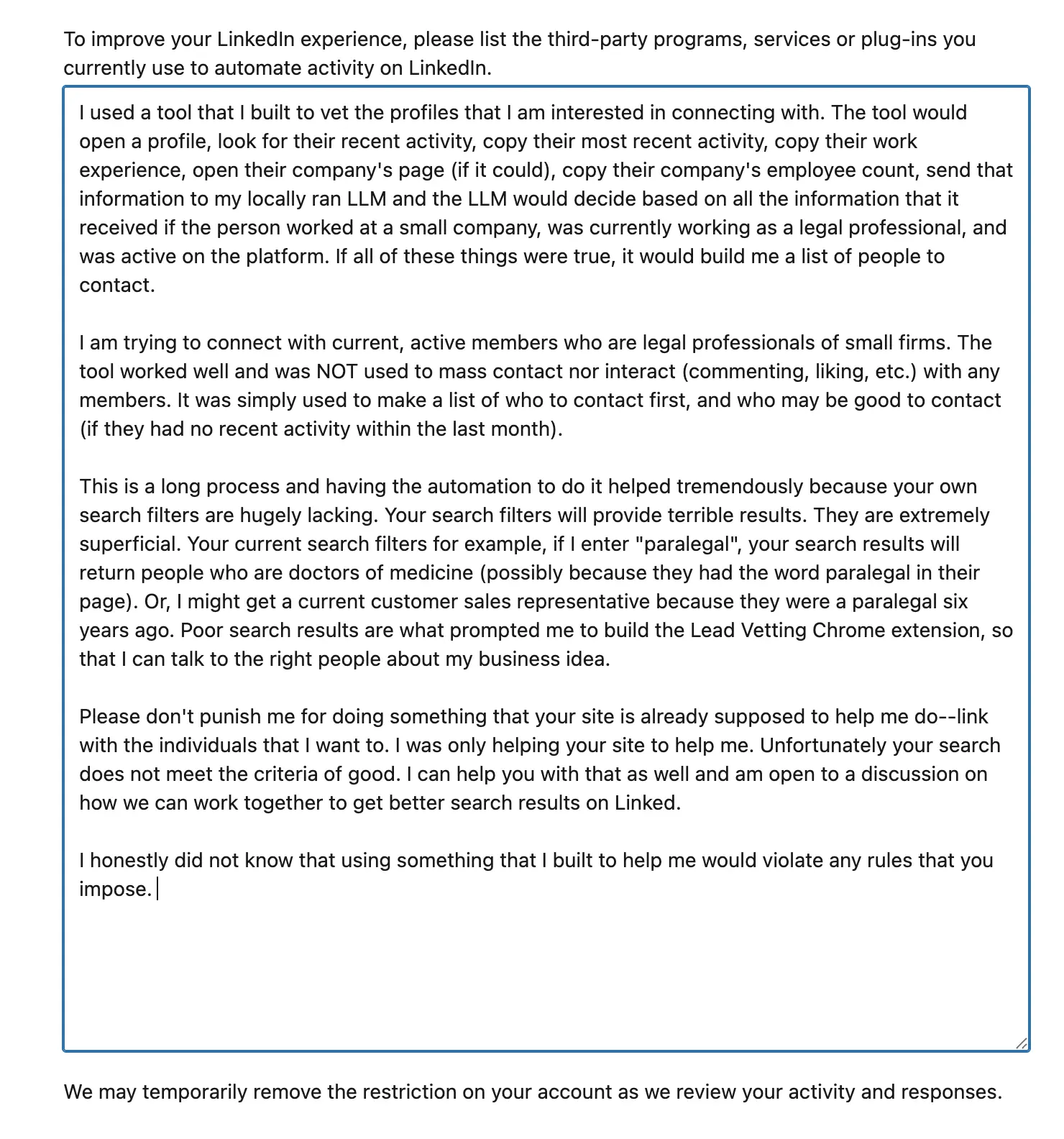
My appeal to LinkedIn support
All in all, I had fun building the bot and this just shows the type of automation that is capable with AI. I mean, how many salespeople or otherwise need to vet a large number of cases or leads? This is a true benefit of having AI. And I can create tooling like that for near free! Thank God for my AI powers!
If you want to check out the code for the Lead Vetter software, see it here. Now, do not judge me on the code quality. Since this software is not something that I can actively use, I didn't bother to architect it and build it as I would something that I am interested in scaling or maintaining. This is for demonstrative purposes ONLY.
As always, thanks for stopping by and I'll see you next time!