article
ToLive AI
Your Personal AI That Knows You
14 min read
Feb 12, 2026

ToLive AI personal assistant
Let's take an architectural dive into the product that made me $1M in ARR—says me to a future audience. ToLive AI is a RAG application that has 18 moving parts.
The thought in this design was to make something scalable, resilient, and secure.
Currently there are three separate data stores: MongoDB, Waitlist S3 bucket, and Journal S3 Bucket (LanceDB).
Two models: amazon.titan-embed-text-v2:0 andanthropic.claude-3-haiku-20240307-v1:0.
AWS Cognito for auth.
Stripe to process payments and manage subscriptions.
From where we were, to here we are
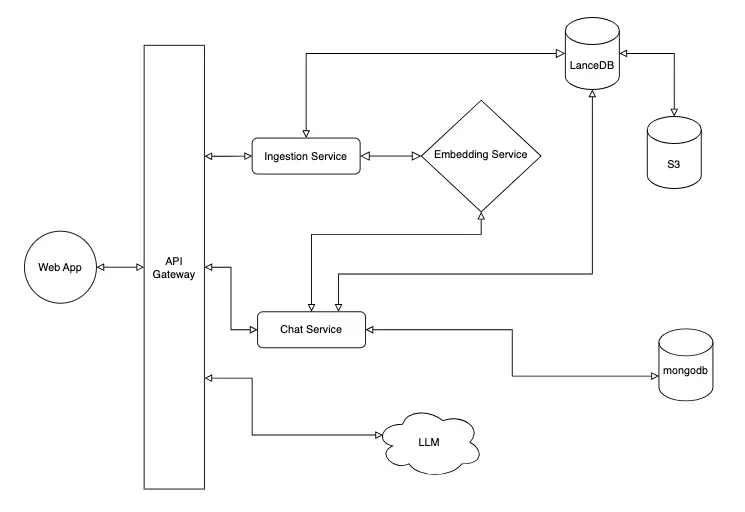
Example RAG architecture.
If you haven't read the Example RAG article, I recommend you do so before reading the rest of this. It goes into the architecture of the local version of this app. The live version has a different architecture. The local version is meant for learning and rapid development. The live version is meant for scale. The architectural decisions that went into the live version were made with scalability, security, and resilience in mind. The local version keeps things as simple as possible, keeeping easy development in mind.
Below is the architectural diagram for the live version of ToLive AI.
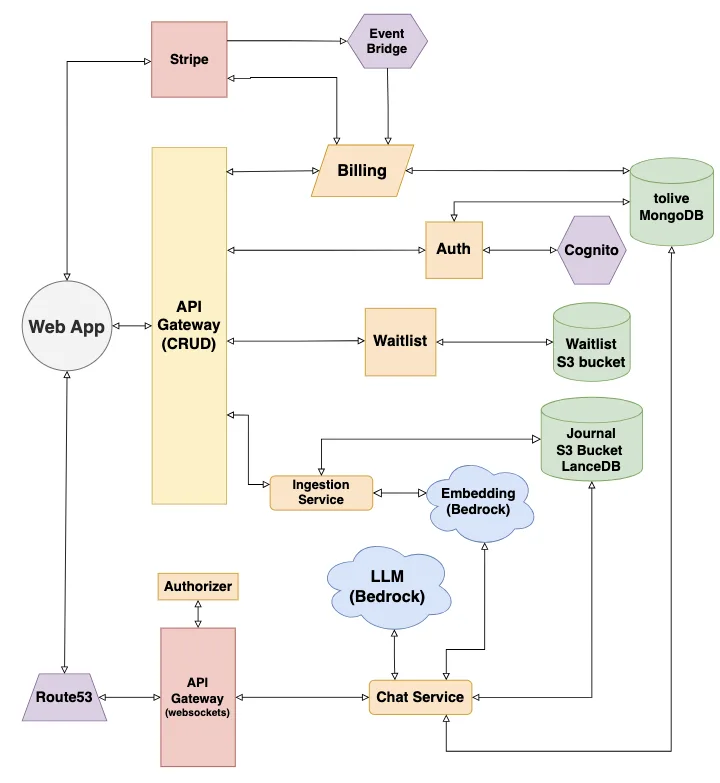
ToLive AI architectural diagram, as of Feb 12, 2026
- Client (Next.js React web app)
- Stripe
- Route53
- REST API Gateway
- Websocket API Gateway
- Authorizer service
- EventBridge
- Billing service
- Auth service
- Waitlist service
- Ingestion service
- Embedding model (Bedrock)
- LLM (Bedrock)
- Chat service
- Cognito
- MongoDB instance
- Waitlist S3 bucket
- Journal S3 Bucket (LanceDB)
*All of the services in orange are AWS Lambdas.
Two Gateways, Different Jobs
We have two API Gateways. One is for holding the websocket connection and the second is for all of our REST APIs. I chose to go with a v1 API. V2 is faster and cheaper and less feature rich. However, for the v1 API the cost per million requests, let's say that I get 100,000,000 requests, my bill only goes up $250. But by that point I'll likely be using the the other features so the future cost is inconsequential compared to the revenue we'll be earning at that point. Pluse I won't incur the OpEx of refactoring the infrastrucure. This was just one of the architectural decisions that had to go into some of the technical decisions in this deployed version.
WebSocket Authorizer Trade-offs
The authorizer lambda is needed for Websocket Gateways authentication verification. Websockets APIs don't support JWT authorizers, like our REST API. I could have used the same Authorizer for my other gateway as well. But here lies a trade-off conversation.
Trade-offs:
- Pro: One fewer Lambda invocation per request — eliminates the authorizer's cold start and execution latency entirely.
- Con: Each service (ingestion, billing, waitlist) now owns auth responsibility. If the validation logic has a bug, it's a security issue. Mitigated by using the same code
shared/src/auth.tsthat the WebSocket authorizer uses. - Con: Each service Lambda cold start now fetches JSON Web Key Set (JWKS) once (previously only the authorizer did this). Acceptable because JWKS is cached at module level — it's a one-time cost per cold start (50-100ms).
Why the WebSocket authorizer stayed
After the $connect handshake, subsequent WebSocket frames don't carry HTTP headers. The authorizer must populate requestContext.authorizer.principalId at connect time so later frames can identify the user. That's an API Gateway constraint you can't work around.
The two gateways have separate responsibilities because the request types they deal with are so different in behavior and form. The gateway is mostly a proxy. The Websocket gateway holds the actual connection. Since the lambdas are ephemeral, they cannot be expected to hold a long-lived websocket connections. And that's why the v2 Websocket API Gateway is necessary.
In our local setup we have one gateway service that can handle both websockets and REST. But hey, it's a local server. We can configure it to do whatever we want.
Why Route53 Was Needed
The problem: Browsers don't send cookies across domains. Our auth cookies were set for tolive.ai, but the WebSocket endpoint was at a4o7rs1e05.execute-api.us-west-1.amazonaws.com. Different domain = cookies not sent = authorizer always got 401.
The fix:Route53 was needed to create a custom domainws.tolive.ai for the WebSocket API Gateway. With cookies set to Domain=.tolive.ai, the browser sends them to both:
- tolive.ai (frontend)
- ws.tolive.ai (WebSocket)
Why Route53 specifically (not Vercel DNS)? Adding NS records forws.tolive.ai in Vercel broke the*.tolive.ai wildcardresolution. Route53 manages the ws. subdomain zone in isolation — only NS delegation records are needed in Vercel, avoiding the wildcard issue. Also, AWS Certificate Manager (ACM) certificate DNS validation is simpler when the zone lives in Route53.
EventBridge for Billing
We use EventBridge in place of webhooks to get payment notifications on our users. Stripe allows us the means through EventBridge to be event driven in our billing service (super important). Our billing service gets notified and our records concerning payment get updated.
I did my best to keep the internals of each service as simple and as uniform as possible. As I continue to add features, I can see this becoming more distributed and more cases for more event driven architecture. There's already a lot going on. And it runs smoothly, “crisp” as one early user put it.
This app will become feature rich. And the architecture will undoubtedly change. However, there are fundamentals that remain the same: separations of concerns, services that do one thing extremely well, testable/DRY code.
Infrastructure
We're using terraform and terraform cloud with GitLab and Vercel. We have a staging workspace and a production workspace all for provisioning and deploying resources in the same account. This works as every resource follows the same naming convention. Here's how we named this v2 Websocket gateway:
${local.project}-ws${local.name_suffix}

                      -- or --

${local.project}-<UNIQUE-RESOURCE-NAME>${local.name_suffix}
This keeps things tightly scoped so we can clearly distinguish staging resources from production.
We use roles (OIDC) to run our Terraform cloud. Instead of creating and managing key pairs we make roles that can be easily managed and assumed by those that need them. I have a Run role that allows terraform to perform OIDC and assume the actual role that will allow us to deploy our resources. This Deploy role has a policy with all the necessary statements allowing the creation of all the resources that we need. This is how you perform strict access controls and least privilege.
We do the same in GitLab where we build and deploy our Docker images to our AWS account. This is a great pattern for operating at scale in large organizations. Ther is no need for endless amounts of key pairs to babysit. Just roles and role assumptions, that makes the ops story so much more governable.
TerraformCloudRole – has a trust policy for OIDC and its only permissions policy is as the following:
{
  "Version": "2012-10-17",
  "Statement": [
    {
      "Effect": "Allow",
      "Action": "sts:AssumeRole",
      "Resource": "arn:aws:iam::320887606173:role/TerraformDeploy-*"
    }
  ]
}
TerraformDeploy-ToLive – has a trust policy that includes theTerraformCloudRole as a Principal - AWS which allows it to be assumed by TerraformCloudRole. The permissions policy looks like the following (truncated for the blog):
{
  "Version": "2012-10-17",
  "Statement": [
    {
      "Sid": "SSM",
      "Effect": "Allow",
      "Action": ["ssm:Get*", "ssm:Describe*", "ssm:List*", "ssm:AddTagsToResource"],
      "Resource": "arn:aws:ssm:*:*:parameter/tolive_ai/*"
    },
    {
      "Sid": "SecretsManager",
      "Effect": "Allow",
      "Action": ["secretsmanager:Get*", "secretsmanager:List*", "secretsmanager:Describe*"],
      "Resource": "arn:aws:secretsmanager:*:320887606173:secret:tolive_ai*"
    },
    {
      "Sid": "S3",
      "Effect": "Allow",
      "Action": ["s3:CreateBucket", "s3:DeleteBucket", "s3:Get*", "s3:ListBucket", "s3:Put*"],
      "Resource": "arn:aws:s3:::tolive-ai-*"
    },
    {
      "Sid": "Lambda",
      "Effect": "Allow",
      "Action": ["lambda:CreateFunction", "lambda:UpdateFunctionCode", "lambda:UpdateFunctionConfiguration"],
      "Resource": "arn:aws:lambda:*:320887606173:function:tolive_ai-*"
    },
    {
      "Sid": "EventBridge",
      "Effect": "Allow",
      "Action": "*",
      "Resource": [
        "arn:aws:events:us-east-1:320887606173:event-bus/aws.partner/stripe*",
        "arn:aws:events:us-east-1:320887606173:rule/aws.partner/stripe.com*"
      ]
    }
  ]
}
It's pretty long so it has been truncated for this example. I hope you get the picture.
CI/CD
We used GitLab for our CI/CD. Each service has its own parent stage and child stages. Those stages are scoped to the changes in their respective service. That way when we make changes to web we only queue up a deployment for web. Take a look at the sample taken from my.gitlab-ci.yml file:
stages:
  - services

ingestion:
  stage: services
  trigger:
    include: ingestion/.gitlab-ci.yml
    strategy: depend
  rules:
    - if: '$CI_PIPELINE_SOURCE == "merge_request_event"'
      when: never
    - changes:
        - ingestion/**/*
        - shared/**/*
      when: manual
    - when: never
Whenever there is a MR and we push to the staging branch with changes to shared and/or ingestion a pipeline automatically runs. When we merge to master a pipeline is queued and we have to manually start the deploy job. This makes promotion to production deliberate and easily traceable. These are things that you want in a SOC II compliant environment.
The corresponding child pipelines are as follows:
include:
  - local: .gitlab/ci-helpers.yml
test_ingestion:
  stage: test
  rules:
    - if: '$CI_COMMIT_BRANCH == "staging"'
  before_script:
    - cd shared && npm ci
    - cd ../ingestion && npm ci
  script:
    - npm test -- --runInBand --coverage
build_ingestion:
  stage: build
  image: docker:24
  services:
    - docker:24-dind
  rules:
    - if: '$CI_COMMIT_BRANCH == "staging"'
  variables:
    DOCKER_TLS_CERTDIR: "/certs"
  id_tokens:
    GITLAB_OIDC_TOKEN:
      aud: https://gitlab.com
  before_script:
    - !reference [.install_aws, script]
    - !reference [.assume_role, script]
  script:
    - aws ecr get-login-password --region $AWS_REGION | docker login --username AWS --password-stdin $ECR_URL
    - docker build -t ${ECR_URL}tolive_ai-ingestion:$CI_COMMIT_SHA -t ${ECR_URL}tolive_ai-ingestion:latest -f ingestion/Dockerfile .
    - docker push ${ECR_URL}tolive_ai-ingestion:$CI_COMMIT_SHA
    - docker push ${ECR_URL}tolive_ai-ingestion:latest
  needs:
    - test_ingestion
deploy_ingestion_staging:
  stage: deploy
  image: registry.gitlab.com/gitlab-org/cloud-deploy/aws-base:latest
  rules:
    - if: '$CI_COMMIT_BRANCH == "staging"'
  id_tokens:
    GITLAB_OIDC_TOKEN:
      aud: https://gitlab.com
  before_script:
    - !reference [.assume_role, script]
  script:
    - aws lambda update-function-code
        --function-name tolive_ai-ingestion-staging
        --image-uri ${ECR_URL}tolive_ai-ingestion:$CI_COMMIT_SHA
        --region $AWS_REGION
  needs:
    - build_ingestion
I'm sure you notice that we don't build in production. That's correct, we promote the one artifact if it is doing what we want to do. This cuts down on wasted build minutes and avoids drift or any inconsistencies with the build.
Rollback
For when the need to rollback comes about we have the following. It's a stand alone pipeline that can be ran with two inputs to deploy a working version of the image to the lambda. And in case you missed it, we're using lambda Docker images.
spec:
  inputs:
    image_uri:
      type: string
      regex: '^.+:.+$'
      description: "Full Lambda container image URI (with tag)"
    function_name:
      type: string
      regex: '^[A-Za-z0-9-_]+$'
      description: "Lambda function name to update"
---
include:
  - local: .gitlab/ci-helpers.yml
stages:
  - deploy
rollback_deployment:
  stage: deploy
  image: registry.gitlab.com/gitlab-org/cloud-deploy/aws-base:latest
  id_tokens:
    GITLAB_OIDC_TOKEN:
      aud: https://gitlab.com
  before_script:
    - !reference [.assume_role, script]
  script:
    - echo "Deploying $[[ inputs.image_uri ]] to $[[ inputs.function_name ]]"
    - >
      aws lambda update-function-code
      --function-name "$[[ inputs.function_name ]]"
      --image-uri "$[[ inputs.image_uri ]]"
      --region "$AWS_REGION"
A rollback strategy is vital. That pipeline is service agnostic. And should there be a need for an audit trail, we have auditable proof that we rolled back.
That's it for now. We're going to talk monitoring next. As we release and see traffic we'll be seeing a lot of logs. I'll also go deeper on some of the other security aspects that we've taken into consideration as we are the custodians of our clients private documents. A lot to capture, yet the world wasn't built in a day. Until next time. Thanks for reading and “always be building.”
Click here to be directed to the live ToLive AI app.