article
Collaborative Product Development
From Idea to Prototype — What was Built and What We Learned
12 min read
Apr 27, 2026
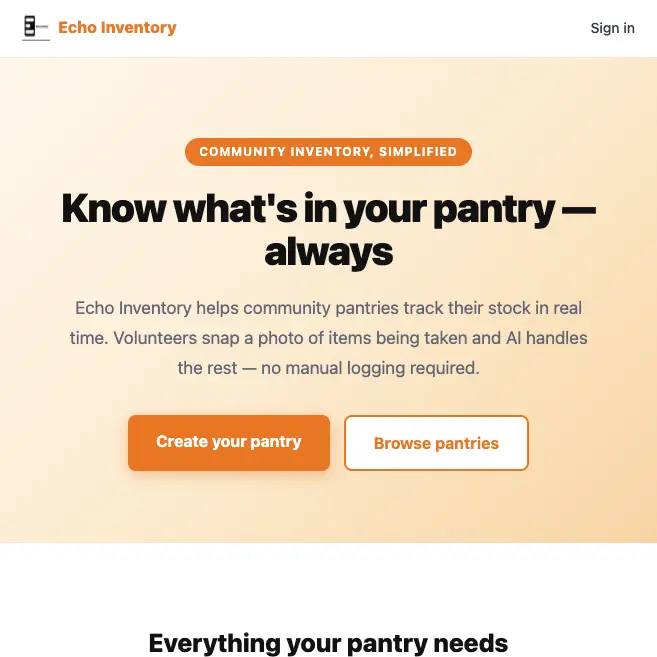
Echo Inventory landing page
I took Collaborative Product Development as a last requirement for a Management in Technology Certification at Scheller College of Business. I had some, minimal, product development knowledge and great respect for the discipline, but I was hoping this class would give me more tools to use as I continue to elevate in my career. TL;DR: It did.
In this article I want to cover two areas: takeaways from the course and Echo Inventory. I'll start in reverse order. With four other classmates we came up with the bright idea to help community pantries manage their inventory. We had two problems that we were trying to solve: 1) find a problem that your product solves and 2) create a product that you can prototype before the end of the course. It was almost like that chicken and egg problem.
Finding the Problem
The first few weeks of the class we focused on thinking about problems. Problems give us opportunities to create solutions—key word, create. They give us opportunities to make money. We were specifically told not to solution. The thing to know is that problems are best found when listening to people. To do that you need to talk to people. As archaic as it may seem, the good old-fashioned concept of opening your mouth and speaking to people really helps you along here.
The problem that we settled on was the one for the community pantry in a group member's neighborhood. In my mind I did not think that this would be a lucrative business or problem to find a solution for. Why? Non-profits usually don't have a lot of money to spend on SaaS products. In a real-world business environment I'm going with something else, but it's the exercise that we want to think and work through, so I go with it.
Note: at no point in this process did we discuss pricing. That's a key tell for product development. It doesn't mean product developers don't care about pricing. Pricing is a commercialization question, not a product development question.
Echo Inventory
After compiling our data and deciding that this was the route to take, I volunteered to be our CTO (and developer) and build the solution. What I came up with was Echo Inventory. Another group member named it and gave us the logo. For the prototype we needed a way for community pantry managers to create an account for their pantry, invite members (other volunteers), input items, update items, delete items, and remove members from their team. Since our market is two-sided, we also needed a way for pantry visitors to browse current inventory and update it when they took something. We thought that would be the perfect use case for AI. So, I built an inventory application.
Architecture
As I thought about the project, I decided to go with mostly managed services and an all-AWS stack with the exception of the frontend. The frontend uses Next.js. We also wanted to make this a progressive web app so that people could save it to their home screen and have it feel like a true mobile app. If we were to expand in the future, we'd probably want to use React Native. Since I was going to tear this app down immediately after the class, I went with the web frontend.
Latency and caching were not a concern for me. If we expected heavy traffic (i.e., thousands of users per day), I would have thought about this differently. I used Lambdas for our backend services so we could rapidly prototype and host the application for nearly nothing. DynamoDB was one of the chosen data stores. S3 was another because I was thinking we might want to do some re-training with the images in the future; but then I thought, no need. We're shutting this down—YAGNI. DynamoDB won as the only data store, with no image persistence.
We needed authentication. I used Cognito. It's fast, AWS-native, secure, and comes with out-of-the-box features that make sign-up and sign-in easy. Authorization is minimal except for the pantry owner. Only they can create and update pantry members. All members can update inventory and access the pantry directly. Anyone can view pantry items and update the inventory by submitting pictures. That last part sounds edgy just writing it. What if someone decided to play a prank and wipe the inventory? They would need pictures to do it, but in theory they could. This is a real security risk that would have to be addressed in production. And for that, an auditable trail tied to user accounts would be the obvious fix.
We used six Lambdas: members, inventory, orgs, auth, image, and post-confirmation. I could have used one and handled everything, but I chose to separate concerns for a more realistic implementation.
An API Gateway sits in front of our Lambdas. Our choice for LLM was Amazon Nova Lite. This was my first time using it. It's great for this prototype. No need for a big expensive model. We just want to examine images, identify food items, and have the model update the database based on what it finds. Nova Lite does that perfectly, and cheaply. Deployment was done with AWS CDK and GitLab with Vercel.
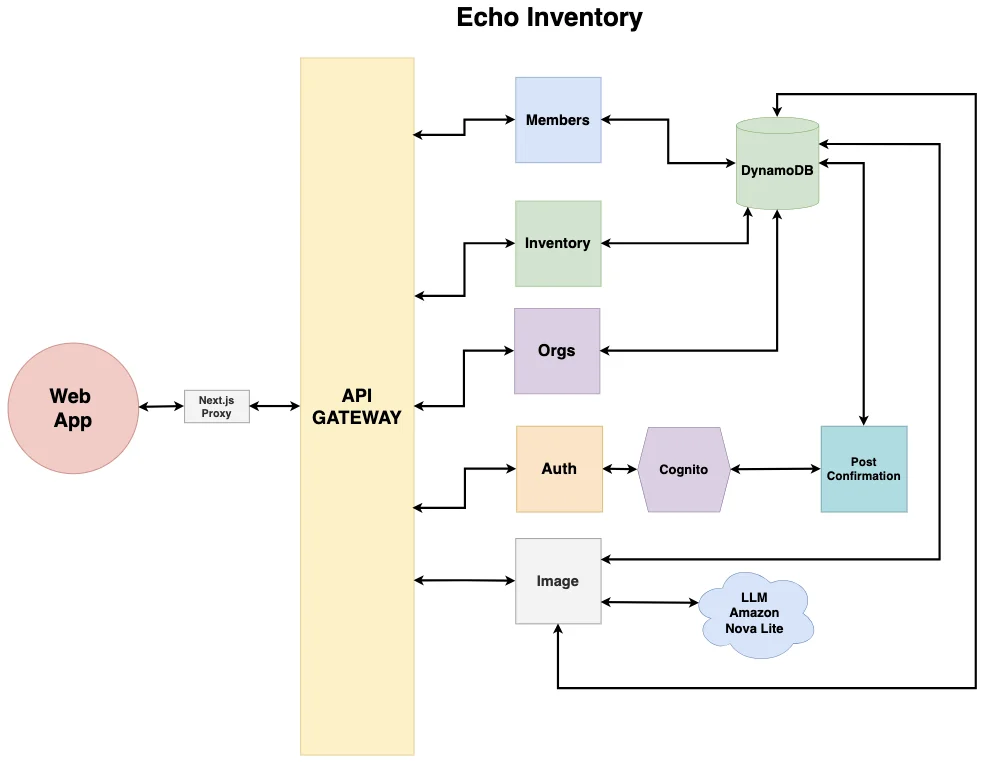
Echo Inventory architecture
Design Doc
Below is a breakdown of each Lambda and its responsibilities.
Members
Members manages org membership: list members, add a member, remove a member.
GET  /orgs/{orgId}/members            — list all members of an org
POST /orgs/{orgId}/members            — add a member (owner only)
  - Creates the Cognito user with a temp password → invitation email
  - Writes membership record (ORG#orgId / MEMBER#userId)
  - Writes reverse lookup record (USER#userId / ORG#orgId)
  - Returns the temp password as a UI fallback

DELETE /orgs/{orgId}/members/{userId} — remove a member (owner only)
  - Deletes both DynamoDB records (membership + reverse lookup)
  - Deletes the user from Cognito entirely
  - Guards against removing yourself or the org owner
Auth
Auth handles the full auth lifecycle: signup, confirm email, login, set password, refresh token, logout, and get current user.
POST /auth/signup       — registers new user (email + password + orgName)
POST /auth/confirm      — confirms email with verification code
POST /auth/login        — authenticates; handles NEW_PASSWORD_REQUIRED for invited members
POST /auth/set-password — completes the new password challenge (invited members, first login)
POST /auth/refresh      — exchanges refresh token (cookie) for new ID token
POST /auth/logout       — returns 200; token invalidation happens client-side
GET  /auth/me           — decodes ID token and returns userId, email, orgName
Orgs
Orgs is read-only. It handles listing and fetching organizations and their inventory for both public and authenticated contexts.
GET /public/orgs                     — list all orgs
GET /public/orgs/{orgId}             — get a single org
GET /public/orgs/{orgId}/inventory   — list inventory (used by the public capture flow)
GET /orgs                            — list orgs the authenticated user belongs to
Inventory
The app is multi-tenant, meaning each org has its own isolated inventory. The orgId in the path scopes every operation to a specific org, which is how the membership check works. All four routes are authenticated and org-membership gated.
GET    /orgs/{orgId}/inventory           — list all items for an org
POST   /orgs/{orgId}/inventory           — create a new item manually
PATCH  /orgs/{orgId}/inventory/{itemId}  — partial update on an existing item
DELETE /orgs/{orgId}/inventory/{itemId}  — delete an item
Image
The image Lambda handles two routes: one authenticated, one public. In both cases the flow is:
1. Accept a base64-encoded image
2. Fetch the org's current inventory from DynamoDB (gives the LLM context)
3. Send the image + inventory context to Bedrock (Nova Lite) via update_inventory tool
4. Apply the tool call result — update existing items or create new ones
5. Public captures are always removals (negative delta)
   Authenticated captures can add or remove

POST /orgs/{orgId}/capture        — authenticated user submits a photo
POST /public/orgs/{orgId}/capture — public visitor submits a photo of items they're taking
Post Confirmation
Post Confirmation is a Cognito trigger, not an API Lambda. It fires once per user signup when the user confirms their email, and writes three DynamoDB records:
1. The org metadata record
2. The owner membership record  (ORG#orgId / MEMBER#userId)
3. The reverse lookup record    (USER#userId / ORG#orgId)
Image Processing and Tool Calling
We needed a way to intelligently process images. Tool calling is what we needed. The LLM also needed image processing capability. Being a product developer, having this type of information helps you design the product. Knowing the model matters too; even in production, a cheap off-the-shelf model is probably all you need. The decision to go with Amazon Nova Lite was the best deal for our use case, and it works perfectly.
From a developer standpoint, we didn't want to manually map data to inventory. We wanted to dynamically extract items from images and have the AI do the work of updating the inventory. That meant the inventory needed to be well-labeled and the AI needed a tool it could use. The more information on each item—description, brand, item type, category, notes—the better job the model can do identifying the right database record to update.
Each time an item is removed, we send the entire inventory as context with the image request: item ID, description, brand, etc. for every item. For a prototype this is fine. At scale, you'd want to cache this data or run a similarity search to narrow the candidate set and let the AI decide which record to update.
Here is the tool definition:
const UPDATE_INVENTORY_TOOL: Tool = {
  toolSpec: {
    name: 'update_inventory',
    description:
      'Update quantity of existing inventory items or add new ones based on what is ' +
      'visible in the image. Use a negative quantity_delta when items are being removed.',
    inputSchema: {
      json: {
        type: 'object',
        required: ['items'],
        properties: {
          items: {
            type: 'array',
            items: {
              type: 'object',
              required: ['name', 'quantity_delta', 'unit', 'category'],
              properties: {
                item_id:        { type: 'string',  description: 'ID of the matching inventory item.' },
                name:           { type: 'string',  description: 'Item name as it appears in inventory, or a new name.' },
                quantity_delta: { type: 'number',  description: 'Amount to add (positive) or remove (negative)' },
                unit:           { type: 'string',  enum: ['pcs', 'boxes', 'kg', 'liters', 'rolls', 'other', 'units'] },
                category:       { type: 'string',  enum: ['Food', 'Electronics', 'Tools', 'Office', 'Clothing', 'Household', 'Other'] },
              },
            },
          },
        },
      },
    },
  },
};
And here is where we used it in the call to the LLM:
const response = await bedrockClient.send(new ConverseCommand({
  modelId: MODEL_ID,
  system: [{ text: systemPrompt }],
  messages: [{
    role: 'user',
    content: [
      { image: { format, source: { bytes: imageBytes } } } as ContentBlock,
      { text: userPrompt },
    ],
  }],
  toolConfig: { tools: [UPDATE_INVENTORY_TOOL] },
}));

const toolUseBlock = response.output?.message?.content?.find(b => b.toolUse);
if (!toolUseBlock?.toolUse) {
  return { updatedItems: [], createdItems: [], message: 'No items identified' };
}

const toolInput = toolUseBlock.toolUse.input as unknown as InventoryToolInput;

// Build a map by itemId for direct lookup — no string matching needed
const itemsById = new Map(inventoryItems.map(i => [i.itemId, i]));
const { updatedItems, createdItems } = await applyInventoryUpdates(orgId, toolInput, isPublic, itemsById);
How Does Tool Calling Work?
1. Define the tool. You declare UPDATE_INVENTORY_TOOL as a JSON schema describing what the LLM is allowed to call and what shape its output must take which is an array of items, each with item_id, name, quantity_delta, unit, and category.
2. Send the image + tool to Bedrock. The image, system prompt, and tool definition are sent via ConverseCommand. The inventory context is embedded in the system prompt so the model knows what already exists. toolConfig: { tools: [UPDATE_INVENTORY_TOOL] } tells the model it has this tool available.
3. The LLM responds with a tool call instead of text. Instead of a text message, the model responds with structured JSON conforming to the tool schema:
{
  "items": [
    { "item_id": "abc123", "name": "Coca-Cola", "quantity_delta": -2, "unit": "cans", "category": "Food" }
  ]
}
4. You execute the tool yourself. The LLM doesn't actually update DynamoDB; it just tells you what should happen. You take its toolInput and run applyInventoryUpdates, which does the real DynamoDB writes. The tool call is a structured contract; the LLM fills it out, you execute it.
How Does the LLM Know It Should Return a Tool Call?
Two things force it:
1. The system prompt explicitly instructs it: “Call the update_inventory tool with every item you identify.”
2. toolConfig—by passing the tool definition to Bedrock, the model knows the tool exists and is available. Without this, the instruction to call the tool would be meaningless.
The model isn't forced to use it. It can still return plain text if it finds nothing to identify, which is why the early return check exists. You could make it mandatory by adding toolChoice: { tool: { name: 'update_inventory' } } to toolConfig.
About Collaborative Product Development
Going from idea to something tangible is what this is all about. As a group we had discussed features like: make a pantry and take a picture to update inventory. But as you can see above, there is a lot more. I was only able to add to that because of my practical experience. Without a decade in software engineering, I wouldn't have thought through multi-tenancy, authentication, mobile vs. web for the prototype, or the trade-offs in the architecture. Good product managers are technical. They just don't implement it themselves. The best product manager I ever had had a BS in Computer Science and a Master's in Operations Research from an Ivy League institution. Technical and knew how to find the answers.
Ask yourself: “If the solution exists, why is it not being used?” Other questions to ask before building a product:
- Why is the problem unsolved or poorly solved?
- Why am I in a good position to dig deep on this problem?
- What industry am I in?
- What is the market segment, competition, capital needs, business strategy?
All of that gives you the script for winning and the playbook for adding value. When looking at ways to improve a product or service, look at how you could also help the vendor or service provider. Ask:
- What are areas to make things more efficient?
- How can we make operators more profitable?
- Have you identified the steps in the customer journey?
- Can you improve or eliminate steps in that journey?
- Have you identified all sides of the market?
Many folks struggle to know if an idea is good or not. The main thing is customer discovery. I've talked about it in My TI:GER Experience. Build on fact—not your own opinion.
What a Prototype Is
Knowing the definition of a prototype is important. Loosely, it is a tool to go from an idea to a position of knowledge. It is an approximation of what you want. You build a prototype to not waste money. It is for learning.
In the case of Echo Inventory, our product depended on marginal and production costs (resources). We had zero money and finite time. However, since there was no physical product, we didn't have to worry too much about constraint imbalances. There is a ton of free tooling out there to get this done at nearly zero cost. And because I have a decade in software engineering. I know many of the best ones. The more constraints you have, the more complex your product is.
What Product Development Does Not Answer
Product development does not answer the questions of:
- What to do with a cool new technology
- Should you patent the idea
- Who will fund the company or venture
- Can we sell the idea rather than build a product
- Who will supply parts or services
All of that goes down the path of commercialization. At this stage, we sense a gap, define a problem, iterate on alternatives, select a concept, and move forward. The main things are to:
- Understand the user needs (customer discovery)
- Brainstorm ideas
- Select the product or service concept
- Test those concepts via prototype or searching for the best idea
What we want at this product development stage is to explore and get a sense of the opportunity, get it done through project management, collaborate with others, and search for the best idea to produce what's needed.
Finally: the customer dictates the product, so listen to them. New products are always the most unpredictable and iterative. The same idea can take a service form. Keep a tight leash on what you create. You may only have a few resources to draw from, so use them wisely. And without a decade of hands-on experience and technological knowledge, all of this would have been far more challenging, especially for the first-timer.
I may use this application to keep my inventory for my home pantry and refrigerator. I doesn't cost me anything to host it. Worst I can remove the signup so that no one else can use it. We'tll see. For now, you can find it at https://echo-inventory.vercel.app.
And before I forget. Echo Inventory was best 2 out of 3 in the class. We were voted the most likely to have impact and the most creative. We didn't get most likely to be funded but we still won. And I can live with that.
Thank you for reading! Until next time.