article
Embedding-Based RAG, Locally: A Serverless-Style Architecture You Can Ship
10 min read
Jan 30, 2026
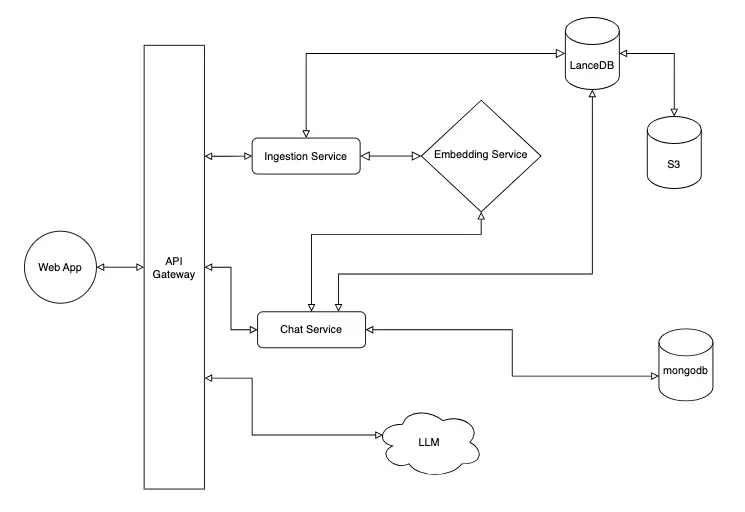
Example RAG architecture.
Retrieval-Augmented Generation (RAG) is only as good as the retrieval it does. In practice, that means building a clean ingestion pipeline, predictable query behavior, and a generation path that uses the retrieved context without leaking architecture complexity into the rest of your system. This article shows a practical, embedding-based RAG design and why I intentionally built it to feel like AWS serverless — but run entirely locally.
Why I built a local AWS-style RAG
I was inspired by AWS's serverless RAG architecture and wanted to build the same idea locally so I could iterate fast, keep feedback loops tight, and still deploy to AWS later with minimal refactoring. The AWS article that is the inspiration for this project is below:
https://aws.amazon.com/startups/learn/serverless-retrieval-augmented-generation-on-aws?lang=en-USThe goal is local parity with cloud services: the same request shapes, the same separation of responsibilities, and the same operational boundaries. In this example we have a complete system that “should” easily be deployable to AWS when the user is ready.
Embedding-based RAG in one loop
Here's the core loop we're designing for:
- Ingest: turn documents into embeddings and store them in a vector database.
- Retrieve: embed a user query and retrieve the closest vectors.
- Generate: send the retrieved context to the LLM to ground its response.
End-to-end architecture (local AWS-style)
The system is organized as a set of small services with clear boundaries. Each service maps directly to an AWS service:
| Local service | Responsibility | AWS equivalent |
|---|---|---|
| Gateway | WebSocket connections + local “Lambda” invocations | API Gateway |
| Ingestion | Process documents, store embeddings | Lambda |
| Chat | RAG retrieval + message persistence | Lambda |
| Embedding | Text → vectors | Bedrock |
| LLM | Response generation | Bedrock |
| LanceDB | Vector store, backed by MinIO / S3‑style storage | LanceDB with S3 backend |
You can see the 1:1 mapping of each service — but every component runs locally so we can iterate quickly and keep architecture drift low.
Ingestion flow (practical walkthrough)
Documents are ingested through the gateway, embedded, and stored in LanceDB:
- Client sends a document over WebSocket.
- Gateway invokes the ingestion service.
- Ingestion calls the embedding service.
- Embeddings are stored in LanceDB.
Query + chat flow
The chat flow pulls context from the vector store and then passes it to the LLM:
- Client sends a user query.
- Chat service embeds the query and retrieves similar entries.
- Gateway streams tokens from the LLM back to the client.
- Assistant response is saved with its RAG context.
And that's the core RAG loop: ingest documents, retrieve relevant context, and generate grounded responses. Much easier said than done. So let's take a look at how we tune the system to give us the most relevant results.
RAG thresholding (relevance control)
One of the most relevant sub-topics in an embedding-based RAG system is relevance control. At first, when using the app I would get back results that were not related at all to my query. After looking into it, I discovered that I needed to perform thresholding on the results returned from the vector search.
A Top-K vector search could return something, even when it's irrelevant. To keep answers grounded, I added a similarity threshold and filter out matches that are too far away in embedding space. Top-K retrieval returns the K vectors closest to the query embedding, regardless of how similar they actually are..
const results = await table
  .vectorSearch(embedding)
  .limit(limit)
  .toArray();

return results.filter((result) => result.score <= maxDistance);
Cosine distance is an important term in machine learning embeddings. To put it plainly, it gives us a simple numeric guardrail. I needed to tune this value to get relevant results for my use case. The range is 0 (identical) to 2 (opposite). I ended up picking a value of 1.2. Why? It just worked well for the entries that I made. And that's where the art of RAG comes in and also the need for MLOps so that you can monitor the performance of your RAG system over time.
| Parameter | Default | Description |
|---|---|---|
| maxDistance | 1.2 | Maximum cosine distance allowed (lower = more similar) |
Top-K vector search (implementation details)
For this app, the vector store that we use is LanceDB and retrieval happens insearchSimilar() in shared/src/db/operations.ts. The Top-K value is controlled by the limit parameter:
Top-K values used in this project:
- General queries: K = 5 (default, configurable via
limit) - RAG context retrieval: K = 3 (hardcoded in the chat service)
After Top-K retrieval, results are filtered by a distance threshold to remove semantically dissimilar matches:
.filter((result) => result.score <= maxDistance)So the pipeline is: retrieve Top-K results → filter by distance score → return relevant matches.
Similarity threshold, cosine distance, and the system prompt
The RAG search uses a similarity score threshold to filter out irrelevant results. This prevents the system from returning unrelated entries when the user's query doesn't match any content.
Configuration shared/src/db/operations.ts called by chat/src/services/chat.service.ts:
searchSimilar(table, queryVector, limit, maxDistance = 1.2)Why this matters: Without a threshold, vector search always returns the top N results regardless of relevance. A query like ”hey“ would return whatever entries happen to be least dissimilar, even if they're completely unrelated. The threshold ensures only genuinely relevant context is passed to the LLM.
From prompt to response
The system prompt is the instruction set that tells the LLM who it is, how to behave, and what context it has available. It's the primary mechanism for customizing LLM behavior without retraining the model.
Location: chat/src/services/chat.service.ts → buildSystemPrompt()
Structure:
function buildSystemPrompt(ragContext: RagContext[]): string {
  if (ragContext.length === 0) {
    return `You are a helpful assistant.
      The user is asking a question, but no relevant documents
      were found. Respond helpfully and suggest they might
      want to add more entries or rephrase their
      question.
    `;
  }

  const contextEntries = ragContext
    .map((ctx) => `[${ctx.entry_date}] ${ctx.text_snippet}`)
    .join("\n\n");

  return `You are a helpful assistant. Use the following
    entries to answer the user's question. Be conversational and
    reference specific details from the entries when relevant.
    If the entries don't contain enough information to answer,
    say so honestly.

    Relevant entries:
    ${contextEntries}
  `;
}
How it works:
The system prompt is sent to the LLM as the first message in the conversation, before the user's message:
Messages sent to LLM:
┌─────────────────────────────────────────────────────────────┐
│ role: "system"                                              │
│ content: "You are a helpful assistant. Use the following.   │
│          entries to answer the user's question...           │
│                                                             │
│          Relevant entries:                                  │
│          [2026-01-27] the price of gold is $5,220.50..."    │
├─────────────────────────────────────────────────────────────┤
│ role: "user"                                                │
│ content: "what's the current price of gold?"                │
└─────────────────────────────────────────────────────────────┘
Why it matters:
| Aspect | Effect |
|---|---|
| Identity | ”You are a helpful assistant for a personal application“ tells the LLM its role and domain |
| Behavior | ”Be conversational and reference specific details“ shapes response style |
| Boundaries | ”If the entries don't contain enough information, say so honestly“ prevents hallucination |
| Context injection | RAG results are embedded directly in the prompt, giving the LLM access to user's data |
Without a system prompt, the LLM would not know it was an assistant and would not have any context about or knowledge of:
- Its purpose
- The user's data
- How to respond (conversational, honest about limitations)
This would leave it prone to hallucinations and other undesired behaviors. Remember, this is still a computer so, garbage in, garbage out.
Customization examples:
| Use Case | System Prompt Modification |
|---|---|
| More formal tone | ”Respond in a professional, formal tone“ |
| Therapy-style | ”You are a supportive listener. Ask reflective questions about the user's feelings“ |
| Data analysis | ”Analyze patterns across entries. Look for trends in mood, topics, and frequency“ |
| Strict factual | ”Only answer questions that can be directly answered from the entries. Never speculate“ |
The RAG + System Prompt pattern: This is the core of how RAG applications work:
1. User asks a question
2. System searches vector database for relevant content
3. Relevant content is injected into the system prompt
4. LLM receives: system prompt (with context) + user message
5. LLM generates response grounded in the provided context
The LLM doesn't have direct database access—it only sees what's included in the prompt. This is both a limitation (context window size) and a feature (you control exactly what the LLM knows).
Why this local serverless style works
The biggest advantage is production parity. Each ”Lambda“ has a single responsibility, storage goes through S3-style interfaces, and the gateway owns WebSocket state — exactly how a cloud deployment would be structured. That keeps your local architecture honest and makes the eventual cloud migration much smaller.
What's next
The follow-up article will cover the cloud deployment details — swapping local services for AWS Lambda, S3, and API Gateway, and the small changes required to run at scale. The point of this build is that those changes stay contained, not architectural.
You can find the full source code for this project on GitHub: here.
Follow-up article here.